Free temporary email app
Temp Mail for Android: a disposable email address in one tap.
Temp Mail is a free temporary email app for Android. Use it for sign-ups, free trials, downloads and verification codes: mail arrives live, and when the timer runs out, the address and its mail are gone.

- No sign-up needed, no phone number
- Mail lands live
- Gone when the timer ends
How it works
How to get a temporary email address in three steps
-
Get a temporary address
Open the app and tap Get my address. Paste it into any sign-up form, download page or Wi-Fi login that asks for an email.
-
Watch mail and codes arrive
Messages land in a second or two, with no refreshing. Verification codes and confirmation links are pulled to the top, ready to use.
-
Let it delete itself
When the postmark timer runs out, the address and every message are deleted. You don’t need an account, a name or a phone number.
Features
Everything a disposable email app needs. Nothing it doesn’t.
-
A disposable address in one tap
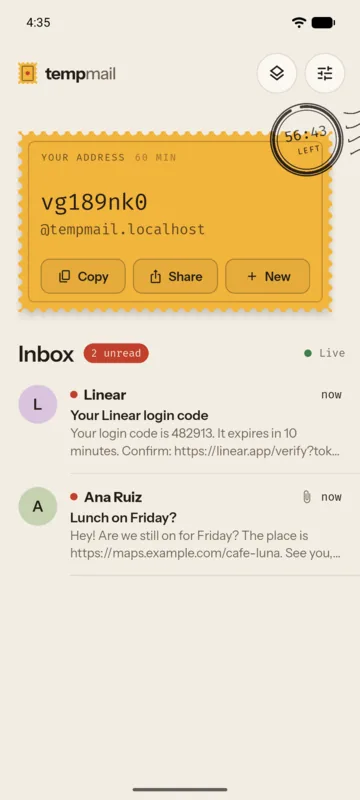
A random email address, instantly. No name, no phone number, no password. Pick a domain, or let the app choose.
-
Your own address name
Prefer a name you’ll remember? Choose the part before the @. Without an account it lasts up to 7 days; with a free TempGenerator account you can keep it longer and bring it back later. A name is only ever given to one person.
-
A live inbox
New mail shows up while you watch, with a red dot on anything unread. No pulling to refresh.
-
Verification codes on top
One-time codes appear above the message. One tap copies them.
-
Check links before they open
Confirmation links become one clear button, and you see where a link really goes before your browser opens it.
-
Tracking images blocked
Remote images stay off by default, so senders can’t tell when you read. Scripts never run.
-
Deletes itself on schedule
When the postmark timer runs out, the address and its mail delete themselves.
-
Speaks 11 languages
English, العربية, Français, Español, Deutsch, Italiano, Português, Русский, 日本語, 한국어 and 简体中文.
-
Light and dark mode
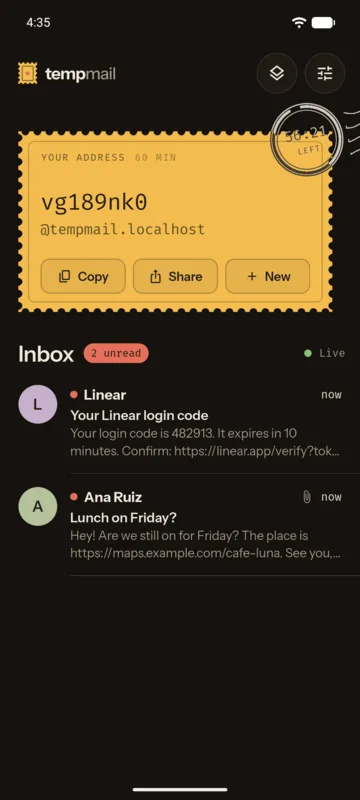
Oat paper by day, a lamp-lit desk by night, or simply follow your phone.
Screens
Stationery, not a spreadsheet.
-
Your address is a postage stamp. The postmark counts down. -
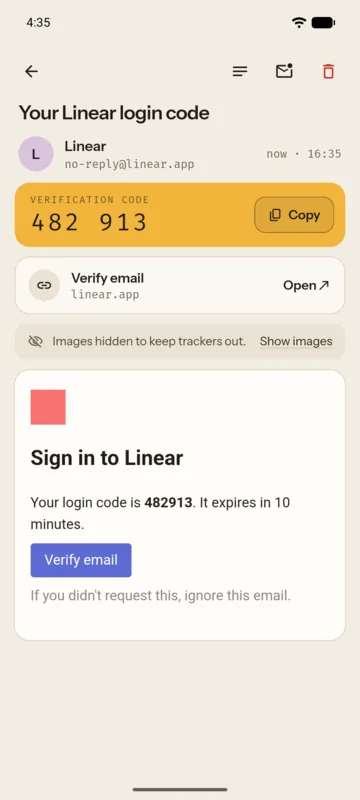
The code you came for, right on top. -
The same desk, under a lamp. -
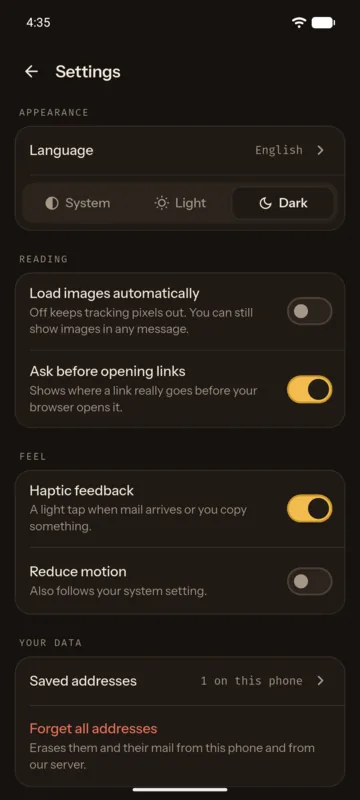
Images, links and motion, your way.
Privacy
Built to know as little about you as possible.
You don’t need an account: no name, no phone number, no password. An account is optional, only for choosing your own address names.
- Your device key and address list stay in your phone’s secure storage, out of backups.
- Mail is kept for 60 minutes, or until a 1–30-day address expires. Addresses you chose keep their mail until they end.
- Remote images and tracking pixels are blocked by default.
- Forget all addresses erases your addresses, their mail and your device record from our server, too. With an account, the addresses you chose stay until you delete the account.
The basics
What is temp mail, and when should you use it?
A temporary email address, or temp mail for short, is a real inbox you give out instead of your own. It receives mail like any other address, but only for a limited time, then deletes itself along with everything in it. You may also hear it called a disposable, burner or throwaway email.
Using one keeps your real address off marketing lists and out of data leaks at sites you’ll never visit again, and the spam that follows a sign-up lands in an inbox that’s about to disappear. Temp Mail is receive-only: you can read mail, copy codes and open links, but not send.
When to use a disposable email address
- Sign-ups and newsletters you only need once
- Free trials, coupons and gated downloads
- Public Wi-Fi logins that ask for an email
- One-time verification codes and confirmation links
- Testing the emails your own app or website sends
When to use your real email instead
- Banking, payments and online shopping
- Work, school, health and government services
- Any account you may need to recover later, since an expired address can’t receive a password reset
FAQ
Temp mail questions, answered.
Is Temp Mail free?
Yes, Temp Mail is free.
Do I need to sign up or give a phone number?
No. Open the app, tap Get my address, and you’re ready. You never need a phone number. A free account is optional: it’s only for choosing your own address names and keeping them longer.
Can I choose my own address name?
Yes. In the app, tap New and then Choose your own name. Each name can be used by only one person, ever, so nobody else can receive mail meant for you. Without an account it lasts up to 7 days; with a free account you can keep it longer and bring it back later.
How long does a temp mail address last?
A new address lasts 60 minutes. Its lifetime is printed on its stamp, and the postmark counts down the time it has left. If you need it for longer, you can keep it for 1–30 days from the app. When the time is up, the address and all of its mail are deleted from our server and can’t be recovered.
Can I use a temp email for verification codes?
Yes. Paste your Temp Mail address into the sign-up form. When the code arrives, the app shows it on top of the message, ready to copy in one tap, and confirmation links show where they really go before anything opens. Some websites block disposable addresses: if nothing arrives, try a new address on another domain.
Is temp mail safe?
For sign-ups and codes you don’t need to keep, yes. You don’t need an account, tracking images are blocked by default, scripts in emails never run, and each inbox opens only on the phone that created it. But anyone who knows a disposable address can send mail to it, and its mail is deleted when the timer ends, so use your real email for banking, work and accounts you want to keep.
Can temp mail be traced back to me?
Senders only see your address. A random address has no name, phone number or account behind it, and tracking images are blocked by default, so they can’t tell when you read. Like any online service, our server processes your IP address and keeps a device record for a limited time, as our privacy policy explains, and we answer lawful requests. Temp Mail keeps your real inbox private; it isn’t a way to hide from the law.
Can senders see when I open their mail?
Not through images: remote images and tracking pixels are blocked by default, and scripts inside emails never run. You can still choose to show images in any message.
Can I send email from a temp mail address?
No. Temp Mail only receives mail. That keeps it simple and stops it from being used for spam.
Can I receive attachments?
Yes. Attachments arrive with the message, and you can share them to another app on your phone. They’re deleted with their message when the address expires. On a 1–30-day address that already holds 100 messages, the oldest one is removed when a new one arrives.
How do I delete my data?
In the app, open Settings and tap Forget all addresses. That erases your addresses and their mail from your phone and from our server. More ways to delete your data.
Is there a Temp Mail app for iPhone or PC?
Temp Mail is an Android app. On an iPhone or a computer, you can get a free temporary inbox in your browser at tempgenerator.com. Addresses made in the app open only in the app.
Need a disposable email address? Get Temp Mail free.
Download the free temp mail app from Google Play, or get a temporary inbox in your browser instead.